When we talk about sustainability in accommodation businesses, we tend to think of solar panels, locally sourced breakfast, waste separation and low-impact cleaning products. The website is rarely part of the conversation. And yet, the internet consumes energy too: every time a guest opens a page, servers, networks and devices work to deliver images, videos and code. The heavier the page, the more data is transferred and the more energy is required.
The good news is that a lighter website is not only more sustainable. It is also faster, works better on mobile devices and helps prevent potential bookings from being lost. In this guide, we’ll look at what makes a website heavy, how to measure its impact using free tools, and what improvements you can make, from the simplest to the most substantial.
Why website size matters, for the environment and your guests
A webpage’s “weight” is the amount of data a guest’s phone or computer needs to download to display it: text, photos, videos, fonts and software. It is measured in megabytes, just like the photos stored on your phone.
Every additional megabyte comes with an energy cost. It may be small for a single visit, but it becomes significant when multiplied by thousands of visits a year. It also affects the people browsing your website. Someone looking for a farmhouse in the hills or a mountain lodge often searches on their phone, perhaps from the sofa in the evening or while travelling with a weak internet connection. If a page takes too long to load, they may simply close it and move on to the next accommodation.
That’s why digital sustainability is not just an issue for large companies. For a small accommodation business, it is also a way to offer guests a better welcome, right from their very first interaction.
Measure your starting point
Before making any changes, it is worth understanding where you stand. All you need is ten minutes and three free tools.
• Website Carbon Calculator. Enter your website address to get an estimate of the CO₂ emissions generated by each page visit, along with a comparison against other websites analysed.
• Google PageSpeed Insights. It tells you how fast your page loads on mobile and desktop, how much data it requires, and what is slowing it down. It also provides a list of recommended improvements.
• Green Web Check by the Green Web Foundation. It tells you whether your hosting provider – the service that keeps your website online – declares that it uses renewable energy.
Start with your homepage and one or two important pages, such as your accommodation or rooms page. Write down the figures: you’ll need them to track improvements and, as we’ll see, to communicate them to your guests.
Images: the first thing to optimise
On most small accommodation websites, the bulk of the data doesn’t come from text, but from photos. And that’s understandable: photos are one of the most important elements of an accommodation website, helping visitors imagine their stay and encouraging them to book. The problem lies in how those images are uploaded.
A photo taken with a good camera or a recent smartphone can weigh several megabytes, while a website usually needs only a few hundred kilobytes. Here’s what you can do:
- Resize your images. A photo that is 4,000 pixels wide but displayed in a space of just 1,200 pixels is unnecessarily large. Upload images at the size they will actually be displayed, or at most twice that size for high-resolution screens.
- Use a modern format. WebP files are much smaller than traditional JPGs at the same quality and are supported by all modern browsers.
- Compress your images. Free tools such as Squoosh can reduce file sizes with just one click, allowing you to compare the before-and-after previews.
- Load images only when needed. Lazy loading means images are downloaded only when a visitor scrolls down to the relevant section of the page. Many platforms, including WordPress, already support this feature.
- Be selective. Your ten best photos can tell the story of your accommodation much better than fifty similar ones.
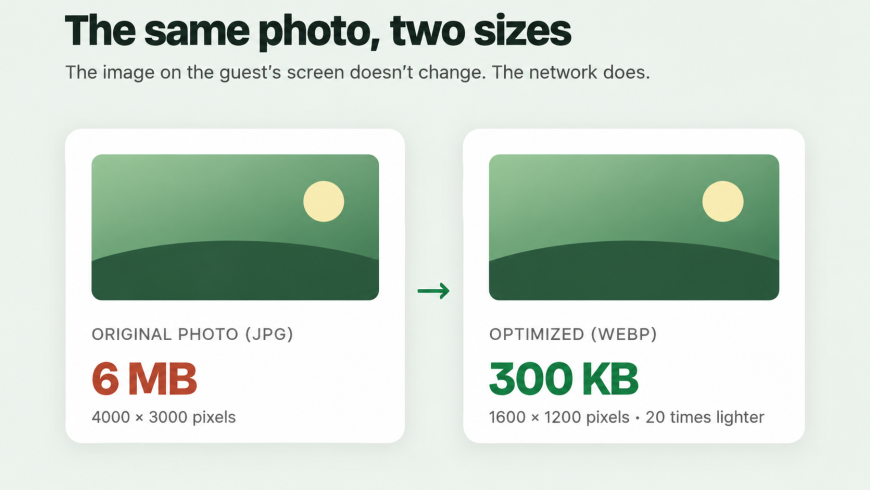
With these steps, you can reduce the size of an image by ten or even twenty times, without guests noticing any difference.
Videos, sliders and widgets: remove what you don’t need
After images, much of a website’s weight comes from all the extra elements added to a page simply “to make it look impressive”.
Videos that play automatically. A full-screen video on your homepage may look impressive, but it is downloaded by everyone who visits your website, even someone who just wants to find your phone number. A better option is to use a beautiful photo with a “Watch the video” button, so the video only loads when someone chooses to play it.
Sliders and carousels. Automatically scrolling images take up a lot of data and are rarely viewed in full: hardly anyone waits for the third photo. A single striking image with a clear headline often works better.
Widgets and add-ons. An Instagram feed, an interactive map on every page, a chat feature nobody uses, plugins installed years ago and never removed. Each one adds code that needs to be downloaded. Keep only what serves a real purpose. For example, a map is usually all you need on your “How to get here” page.
Fonts. Fonts also add weight to a website. Two font families are usually enough to create a well-designed site.
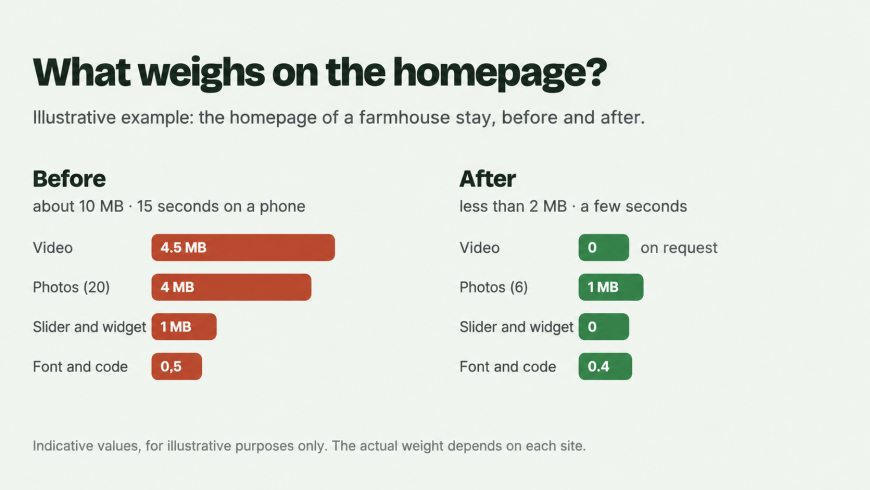
Here’s an example. The homepage of a farmhouse featuring a full-screen video, a gallery of twenty original photos and a few social media widgets can easily exceed 10 MB. The same page, with one main photo, six optimised images and a video that loads only on request, can weigh less than 2 MB. To visitors, the website looks just as good – in fact, it loads in a few seconds instead of fifteen.
Pages and documents: less is more
A sustainable website is also a well-organised one. Over the years, websites tend to accumulate pages about past events, expired offers and news from several seasons ago. Cleaning them up makes your website clearer for guests and easier to manage.
A common issue is large PDF files: price lists, restaurant menus and accommodation brochures. They often weigh 10 or 20 MB and are downloaded just to check a price. It is better to turn this information into a webpage: it is lighter, easier to read on a phone and simpler to update. If you really need a PDF, make sure you compress it before uploading it.
Green hosting and website maintenance
Your website “lives” on a server that consumes energy around the clock. Choosing hosting powered by renewable energy is one of the most impactful improvements you can make, and it often doesn’t cost any more. The Green Web Foundation maintains a public directory of verified providers where you can check your own hosting service. If most of your visitors are based in Italy or elsewhere in Europe, choosing a server located in Europe can also help reduce the distance data needs to travel.
Then there’s maintenance. A regularly updated website with caching enabled (a ready-made copy of your pages that prevents the server from having to rebuild them for every visit) uses fewer resources and responds faster. Remember to repeat your measurements once a year, before the start of the season: websites tend to become heavier over time, one new photo and one new offer at a time.
Tell your guests about your choices
If sustainability is part of your accommodation’s identity, you can include your lightweight website among the choices you share with your guests. Just follow the same rules that apply to all your other environmental claims: avoid vague statements such as “eco-friendly website” and focus instead on verifiable facts. For example: “We’ve reduced our homepage size from 9 MB to 1.5 MB, and our website is hosted on servers powered by renewable energy.” It’s concrete, verifiable and demonstrates an attention to detail that guests appreciate.
Where to start: your checklist
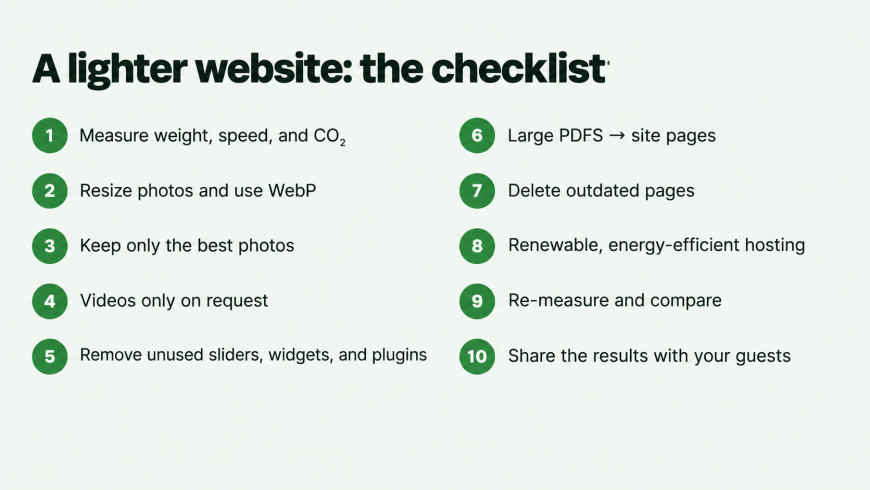
- Measure the size, speed and CO₂ emissions of your homepage and write down the figures.
- Resize your largest photos and convert them to WebP.
- Reduce your galleries to your best photos.
- Replace autoplay videos with a photo and a play button.
- Remove unnecessary sliders, widgets and plugins.
- Turn large PDF documents into webpages.
- Delete outdated pages and expired event listings.
- Check whether your hosting provider uses renewable energy.
- Repeat your measurements and compare the results.
- Tell your guests what you’ve done, using figures to back it up.
You don’t need to do everything in one day, or rebuild your website from scratch. Even tackling just the first three points can make a big difference. A lightweight website is a bit like a well-insulated building: it uses less energy, offers a better experience and makes a difference to everyone who visits, even if they can’t quite put their finger on why.

Author: Enrico Fusco is a web marketing consultant based in the province of Treviso, Italy. For the past ten years, he has been helping businesses, professionals and local organisations build their online presence through websites, Google and social media. One of the sectors he works with is tourism marketing, supporting businesses ranging from accommodation providers to beach resorts.